About this article This article is part of Building with Claude — A Practitioner's Guide to the Anthropic API, a study-notes-plus-commentary series based on Anthropic's official "Building with the Claude API" course (hosted on Coursera) and the public Anthropic API documentation at docs.anthropic.com.
Original course and documentation material is © Anthropic. Direct quotes are cited inline. Commentary, code adaptations, and examples are © DataMy. This series is independent and not affiliated with or endorsed by Anthropic.
Companion notebook:
B2_multimodal_images_pdf.ipynb·llm_client.pySetup: seeREADME.mdin the series repo · Datasets:data/dashboard_screenshot.png,data/qbr_q3_2025.pdf,data/saas_metrics.csv· Data generation:scripts/generate_data.py
The honest inventory of what Claude can read
Most "multimodal" marketing implies Claude can read anything you hand it — Word docs, Excel sheets, audio recordings, video clips, HTML pages. It cannot. The actual list of modalities the Anthropic API natively accepts is short:
- Text — UTF-8 strings, including everything you can serialise to text (JSON, CSV, Markdown, source code).
- Images — PNG, JPEG, GIF, or WebP, passed either as a URL or as base64-encoded bytes.
- PDFs — full documents, rendered visually and processed per page.
That is the entire native surface area as of June 2026.
Every other format — DOCX, XLSX, PPTX, HTML, audio, video, structured database rows, raw binary — has to be converted first into one of those three before Claude can see it. Knowing which conversion is the right one for the situation is the practitioner skill this article is really about. The image-and-PDF mechanics are the easy half; the convert-first judgment is the half that decides whether your application is good or expensive.
This article walks through both:
- §1–§3 — the three things Claude reads natively, with the mechanics for each.
- §4 — the conversion patterns for everything else.
- §5 — token economics across modalities. (Sending a 1000-row table as an image is dramatically more expensive than sending it as CSV text. Most beginner code gets this wrong.)
- §6 — privacy and PII considerations when feeding the model documents.
1. What Claude natively accepts
The full list, with the basic API shape for each.
Text
A user message with "content" as a string, or as a list of content blocks of "type": "text". This is what every notebook so far has been doing. Nothing more to say.
Images
Anthropic's documentation summarises image support as:
"The Claude models can analyze image content provided as input. Supported image types are JPEG, PNG, GIF, and WebP." — Anthropic API Docs, "Vision".
There are two ways to pass an image:
# Option A: base64-encoded inline
import base64
img_bytes = open("dashboard.png", "rb").read()
img_b64 = base64.standard_b64encode(img_bytes).decode("utf-8")

content = [
    {
        "type": "image",
        "source": {
            "type": "base64",
            "media_type": "image/png",
            "data": img_b64,
        },
    },
    {"type": "text", "text": "Summarise the trends shown in this dashboard."},
]
# Option B: URL reference
content = [
    {
        "type": "image",
        "source": {"type": "url", "url": "https://example.com/chart.png"},
    },
    {"type": "text", "text": "What does this chart show?"},
]
Use base64 when the image is local, ephemeral, or sensitive (you don't want it sitting on an external URL). Use URL when the image is already hosted on infrastructure you control and you want to keep request size small.
PDFs
PDFs are the most underrated modality. Claude does not extract text from the PDF and send it as plain text — it processes each page visually, page by page. That means it sees layout, tables, figures, headers, footnotes, and the visual structure of the document, not just the OCR'd characters. The trade-off is that PDFs are more expensive than the equivalent text.
content = [
    {
        "type": "document",
        "source": {
            "type": "base64",
            "media_type": "application/pdf",
            "data": pdf_b64,
        },
    },
    {"type": "text", "text": "What were the Q4 priorities listed in this report?"},
]
The official docs are explicit about the cost model:
"PDFs are processed as a combination of text and images, with one image extracted per page in addition to the text content." — Anthropic API Docs, "PDF support".
Practical consequence: a 30-page PDF is roughly 30 image-equivalents plus the text content. For long documents this dominates the input cost. We come back to this in §5.
2. Images: when to use them, when not
A common mistake is to send Claude an image whenever the source is visual — even when the underlying information is structured data the model would handle better as text.
The simple rule:
| If the source is... | Pass it as... |
|---|---|
| A photograph, screenshot of a UI, hand-drawn diagram, scanned document | Image. No structured text exists to extract. |
| A chart or dashboard where you have the underlying numbers | CSV text. Cheaper, more accurate, and the model can compute on the values. |
| A chart or dashboard where you do not have the underlying numbers | Image. Claude can read approximate values off axis ticks. |
| A PDF report (text-heavy, with tables and structure) | PDF. Layout matters; visual processing is worth the cost. |
| A PDF report you generated yourself from Markdown | The original Markdown. Vastly cheaper, no information loss. |
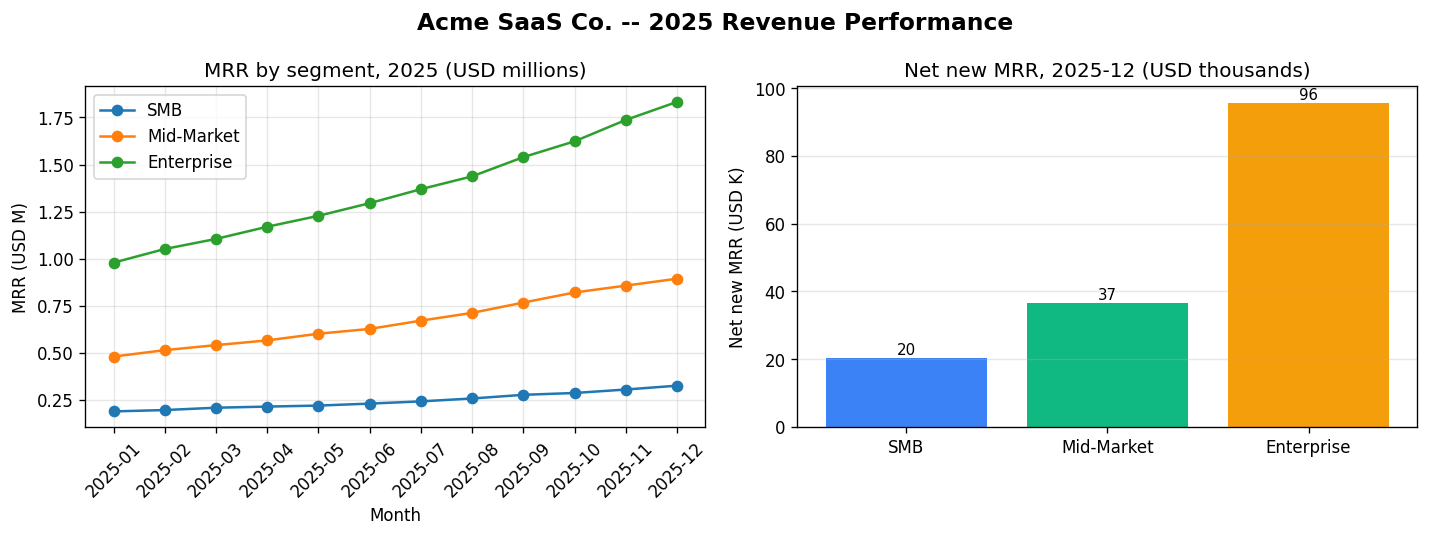
The companion notebook demonstrates the chart-vs-CSV trade explicitly: it asks the same question of the dashboard PNG and of the underlying saas_metrics.csv. The CSV-fed answer is more precise (exact figures) and costs roughly an order of magnitude fewer input tokens.
Image size and pricing
The docs cap each image at a maximum file size and recommend resizing oversized images before sending:
"If you submit images larger than 1568 pixels on the longest edge, they will be resized to fit within these dimensions, preserving the aspect ratio." — Anthropic API Docs, "Vision — image size", accessed 2026-06-08.
In other words, sending a 4K screenshot does not give Claude better vision than a downsized 1568-pixel version — it just costs more tokens to upload. Downsample images to ~1500px on the long edge before sending unless you have a specific reason not to. This single line of code can cut multimodal cost meaningfully on production traffic.
3. PDFs: the hybrid case
PDFs deserve their own treatment because they behave differently from both images and text.
What Claude actually does with a PDF:
- Renders each page as an image at high resolution.
- Extracts the text layer (if the PDF has one).
- Passes both representations to the model for the whole document.
This means PDFs work well for almost any source: scanned documents, native PDFs with extractable text, mixed text+chart business reports, regulatory filings. The downside is that page count, not text length, drives cost — a single 20-page PDF with sparse content can be more expensive than a 50-page Markdown file with dense content.
Two patterns worth knowing:
- Split big PDFs. For a 200-page document where the question relates to one section, use a PDF-splitting library (
pypdf) to slice out only the relevant pages before sending. - If you generated the PDF yourself, send the source. A QBR report exported from Markdown is dramatically cheaper to feed back as Markdown text than as a rendered PDF. Reach for PDFs when you do not control the source format.
The companion notebook uses the QBR PDF generated by scripts/generate_data.py to demonstrate the PDF Q&A pattern, then shows the same Q&A on the underlying Markdown for a cost comparison.
4. Beyond the native three: the convert-first patterns
This is the part most beginner tutorials skip. Real production traffic includes audio recordings, video clips, Excel sheets, Word documents, HTML pages, and a long tail of formats Claude doesn't natively accept. The pattern is always the same: convert to text, image, or PDF first; then call the API.
Here is a working playbook by source format.
Audio (calls, voice memos, meetings)
Claude has no native audio input as of June 2026. The standard pattern:
- Transcribe with a dedicated speech-to-text service (OpenAI Whisper, AssemblyAI, Deepgram, or a self-hosted model).
- Feed the transcript to Claude as text.
For meeting recordings, request the transcription with speaker labels and timestamps:
[00:01:14] Alex (CSM): We're going to lose them on the renewal if we don't address the dashboard latency.
[00:01:22] Priya (Eng): What's the SLA target they're tracking against?
Claude's reasoning over labelled, timestamped transcripts is significantly better than over a flat wall of text. Speaker labels also let you ask questions like "what objections did Alex raise?" — a capability you lose with naive transcription.
Video
No native video input either. Two patterns, depending on the question:
- Frame-sample to images. Extract frames at a low rate (one frame per 1–5 seconds with
ffmpeg), send the frame sequence as a list of images. Works for questions about visual content ("which slide shows the migration timeline?"). - Audio-track to transcript. Strip the audio with
ffmpeg, transcribe, feed as text. Works for questions about what was said ("when does the speaker introduce the Q4 plan?").
For mixed questions, do both and feed them together in one call. Token cost adds up quickly with frame sampling, so cap your frame count aggressively.
Office documents (DOCX, PPTX, XLSX)
Three options, in increasing cost and fidelity:
- Extract to text/Markdown. Use
python-docx,python-pptx, oropenpyxlto pull raw content. Cheapest. Loses formatting and visual context. - Convert to PDF. Use LibreOffice headless (
soffice --headless --convert-to pdf) or a library likedocx2pdf. Preserves layout. More expensive. - Render to images, one per page/slide. Use the same conversion tools then split the PDF into PNGs. Most expensive. Use only when layout, charts, or images embedded in the doc are central to the question.
For Excel specifically: if the question is "what does this number mean", convert to CSV and send as text. If the question is "what does this dashboard look like", render to PDF or image.
HTML pages
Two patterns:
- Strip to Markdown.
html2text,trafilatura, orreadability-lxmlextract the meaningful text from a web page and discard the chrome. Send the Markdown to Claude. Right for content questions ("what does this article say about X?"). - Render and screenshot. Use Playwright or Puppeteer to render the page in a headless browser and capture a PNG. Right for visual or layout questions ("does this page have an obvious CTA?").
Structured data (database rows, large tables)
The most common mistake here is to render a table as an image when you have the data in structured form.
| Data shape | Best representation |
|---|---|
| Up to ~50 rows × ~10 columns | Inline CSV text. Cheap, exact, computable. |
| ~50–500 rows | Inline CSV text but consider summarising first (aggregations, top-N) before sending. |
| Larger than 500 rows | Don't send the full table — summarise, sample, or use RAG (B4) to retrieve relevant rows. |
| Anything where the answer requires precise arithmetic | Send as text or hand off to the code-execution tool (C1). |
If the user explicitly asks "what does this chart show", and the chart is what they're looking at, then send the chart image. Otherwise, send the data.
5. Token economics across modalities
A rough sense of relative cost, useful as a back-of-envelope check before you ship a feature:
| Input | Approximate token cost |
|---|---|
| 1,000 tokens of plain text | 1,000 input tokens |
| A 1568×1568 image (the resized maximum) | ~1,600 input tokens |
| A typical screenshot or chart (~1200×900) | ~1,000 input tokens |
| One PDF page (text + rendered image) | varies — figure on ~1,500–3,000 tokens per page for typical business documents |
| A 30-page QBR PDF | ~60,000–80,000 input tokens |
| The same QBR sent as Markdown | ~3,000–5,000 input tokens |
The QBR row is the headline number. A long PDF can cost 10–20× as much as the equivalent Markdown. If you control the source format and the layout is not load-bearing, send the source. If you don't control the source or the visual structure matters, eat the cost.
Always confirm current per-token pricing at anthropic.com/pricing — image and PDF rates are listed separately from text input rates and have changed over time.
For long, frequently re-used documents (a regulatory filing, a system runbook), prompt caching (B3) is the lever that makes the cost tolerable. Once a document is cached, subsequent calls only pay the cache-read rate, which is dramatically lower.
6. Privacy and PII
Two reflexes worth building:
- Treat every uploaded file as if you were emailing it to an outside vendor. Because, functionally, you are. Apply the same data-classification rules your organisation uses for third-party processors.
- Redact before you send, not after. PII redaction is the kind of thing that is easy to add at the boundary (a function that runs before every multimodal call) and impossible to add later. Use a dedicated library (Microsoft Presidio is a reasonable default) and version-control the redaction rules.
For PDFs containing sensitive content, splitting the PDF before sending — so you only send the pages relevant to the current question — is a privacy lever as well as a cost lever.
Practitioner Notes
- Resize images before sending. A single
Pillowresize to 1500px on the long edge will reduce your multimodal token bill significantly with zero loss of useful information. Add it to whatever wrapper you build around the multimodal call path. - Default to text representation. Whenever you have the underlying data, send the data. Send the image only when the visual is the point. This is the single biggest cost lever in multimodal applications.
- Cache long PDFs. Combined with B3's prompt caching, a long PDF you reference repeatedly stops being expensive after the first call. Don't write off PDFs as too costly without considering the caching pattern.
- Log the modality, not just the token count. Knowing that 40% of your input tokens come from PDFs but only 15% of your calls use PDFs is the kind of insight that immediately tells you where to optimise. Add a
modalityfield to your call log. - Build a single "anything to Claude" function. Wrap the convert-first patterns in a function
to_claude_input(file_path) -> list[content_block]that inspects the file extension and routes to the right conversion. Once it exists, all of your application code becomes modality-agnostic.
Beyond the Docs
The official course covers images and PDFs as discrete topics. Two things the course doesn't make explicit:
- The convert-first rule is more important than the multimodal API itself. Anthropic's docs accurately describe what the API supports. They cannot tell you that 70% of practitioner traffic involves formats outside what's supported — and that the conversion strategy is the design decision that matters. Almost every real multimodal application is, in practice, a conversion pipeline that ends in a Claude call.
- Most beginner multimodal code over-uses images. The reflex "this is a chart, send it as an image" is almost always wrong when you control the underlying data. The cheaper, more accurate move is to send the data and let Claude compute. Treat image input as a fallback for when you have no structured source — not as a default.
Previous: B1 — System Prompts, Roles & Output Control Next: B3 — Augmenting Model Reasoning: Extended Thinking + Prompt Caching Series index: Building with the Claude API — A Practitioner's Guide
Based on Anthropic's "Building with the Claude API" course (Coursera) and public API documentation. Commentary © 2026 DataMy. Not affiliated with Anthropic.